
It’s been a long learning exercise on how to best manage drivers that need to be injected into a new operating system as part of a bare metal deployment. While the initial “chaos” approaches (“inject all the matching drivers and let Windows pick the best”) that were implemented in the Microsoft Deployment Toolkit and Microsoft Configuration Manager have fallen out of favor, the “model-based drivers” implementation needed too much TLC as well. On the MDT side, people replaced awkward selection profile-based approaches with task sequence steps that just copied the needed drivers. On the ConfigMgr side, people realized that it wasn’t very good at downloading gigabyte packages containing very large numbers of very small files.
This was helped by vendors who have provided model-specific driver packs as a starting point. Too bad they didn’t all agree on a format for the driver packs themselves, or for machine-readable manifests that explained which ones were needed for what models. But at least with solutions like Maurice Daly’s Driver Automation Tool, that could be abstracted away to give you a simple process for getting the drivers you need for the models you need to support.
So when it came time to do driver management with DeployR, we had the benefit of being able to learn from many years of experience. We implemented two mechanisms:
Bring your own driver pack. Point us at a folder with model-specific drivers and we’ll upload all of them. That driver pack can be tagged with the manufacturer and model, and we’ll automatically download and inject it as part of the task sequence. An example driver pack for the Dell Optiplex Micro 7010:
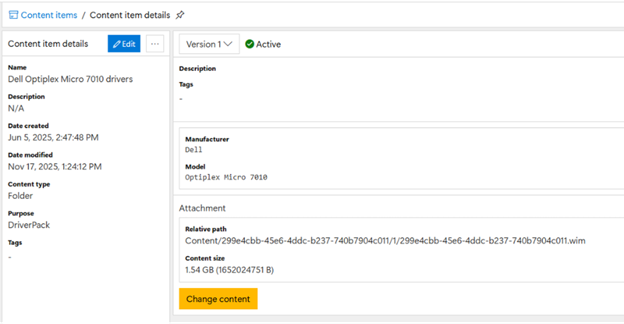
We took a large folder containing the files (extracted from Dell’s original .cab file), uploaded them, and then automatically compressed them into a .wim file, which has multiple advantages:
- Single-instance storage. These driver packs often have duplicate files in them, and .wim files are able to detect that and only store the file once.
- Efficiency during downloading. It’s much faster to download one single file than it is to download tens of thousands of little ones.
The driver pack is tagged with the manufacturer and model so that the task sequence doesn’t need to do anything but specify to inject drivers, it will automatically find any that match the current model:
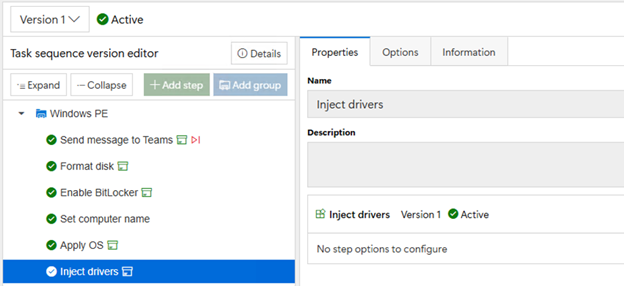
Simple and straightforward, but you still must do the work of downloading and extracting the drivers yourself. So that leads to option #2…
Download driver packs directly from the OEMs. DeployR maintains a list of all the available driver packs from Dell, HP, Lenovo, Microsoft, Panasonic, Acer, and VMware, updating several times a day (hourly at present, but that might be overkill). The “Inject cloud drivers” asks a DeployR cloud service for any matching driver packs; it returns a list of URLs that need to be downloaded.
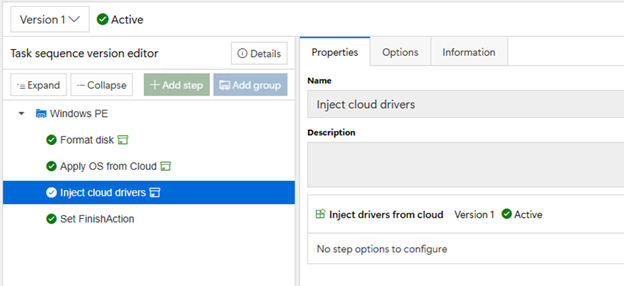
Remember how I said the OEMs all did things differently? Those downloads come in many different forms: zip files, cab files, self-extracting executables, MSI files, etc. Regardless of the file type, DeployR knows how to extract the contents in Windows PE so all the drivers can be injected offline into the OS before it boots for the first time.
That doesn’t mean we’re done yet though, as we know there are more features we can add. We know some aren’t comfortable downloading driver packs from the OEMs because they can change them at any time and that could break something. So we plan to provide a mechanism to “import” those into DeployR, giving you full control over when you migrate to a newer version.
There are also some challenges around the Windows Recovery Environment (WinRE) boot image that is installed by Windows. It is often necessary to inject drivers into that .wim file as well to ensure that Windows has the needed network and mass storage (and in some annoying cases, keyboard and touchpad) drivers; we can help automate that process.
For those that have looked at ARM64 bare metal imaging (yes, DeployR supports that), you may have noticed that the driver management situation there can be frustrating as well. Unlike x64 devices, the Windows 11 ARM64 media has almost no drivers included in it, so it’s always necessary to inject drivers. And it often requires adding a lot of drivers to Windows PE ARM64 to make things work. We believe at some point it will be necessary to support different driver sets for different models in Windows PE, so we will need to support multiple boot images per architecture, so we’ll be adding that to DeployR.
Top Posts
2Pint Software and Omnissa partnership: Closing the gaps in OS deployment, bare-metal imaging, bandwidth optimization, and endpoint recovery
2Pint Software blog roundup - early summer 2026 edition
2Pint Software blog roundup - spring 2026 edition

By Ranjith Lewis

By David Meurer
By David Meurer

By Andreas Hammarskjöld