
StifleR 3.0 sets a new standard for real-time intelligent content and bandwidth management across all traffic types, while also delivering deep deployment visibility. This will empower IT teams with unmatched control, insight, and efficiency, providing the most advanced and comprehensive solution to help organizations protect their business critical applications, while gaining deeper visibility and control over content distribution and network health. There are over 300% more analytics data points for deeper operational intelligence. StifleR 3.0 is the culmination of 9 years of continuous, performance-driven, IT customer-focused improvements.
Yes, it really has been 9 years – we checked the logs - during which StifleR, has been protecting networks, speeding up content delivery through peer-to-peer transfers, and providing real-time analytics. Over the last couple of years, we have been working away on our latest vision of network and bandwidth management in the form of StifleR 3.0 – and it’s finally here!
For a few years now, StifleR 2.10 has been our core in the managment and optimization of all transfers via WAN or LAN. We do this by controlling endpoint download activity and while keeping the various Microsoft peer-to-peer services (BranchCache, Delivery Optimization) in check and telling them to behave. From there, StifleR does the clever bits caching, deduping, throttling, and optimizing everything network-by-network so the right solution hits the right problem at the right time. You know it, if it involves networks and bandwidth, StifleR runs the show.
Why 3.0?
Customers face new and growing challenges in content and bandwidth management. These challenges include the growing amount of ‘non-peerable’ content coming directly from the internet, the increasing frequency and larger transfer size of regular updates, and the many new content types. Microsoft Intune, WinGet and Teams are but three examples of this major ongoing content deluge. We continue to add the StifleR secret sauce to these and the changing landscape of BITS and DO enabled content. But there’s much more to StifleR 3.0 than that – read on to drill down into the cool new stuff.
Good things come in threes or 3.0s
With 3.0, StifleR has matured to become far more cloud friendly. It’s built to take on these new, everyday challenges in content and bandwidth management that teams increasingly face with every update, patch, and ever-growing content types. StifleR now speaks Intune and Autopilot fluently, and we upgraded authentication and access capabilities with OAuth/SAML (Hello Entra ID!) so it runs perfectly with the new revamped remote tools.
The analytics stack also got a makeover and with more data points, making it more informative and easier — even enjoyable — to read. We made installs, configuration, and upgrades far simpler, so getting StifleR up and running (or moving to 3.0) is smoother than ever. And yes — the StifleR core is stronger than ever. That’s the whole job, after all. Let’s get into the nitty-gritty.
You’re a Wizard Harry!
Let’s start with the installation and configuration of StifleR 3.0. Gone is the need to update a configuration file or to uninstall and reinstall the software to apply updates. The result is a slicker installation and upgrade process for StifleR 3.0. The whole configuration process has also been simplified by replacing error-prone manual editing of the configuration-file with a guided Configuration Wizard. Configuration now includes defaults validation and short descriptions for each setting (so you actually know what you are tweaking). The new Configuration Wizard will guide you through the setup, installation, and configuration process and speed up the path to future improvements and upgrades. As an added value, the admin team can see which values were changed from default installation.
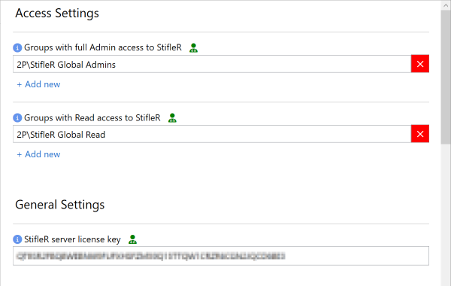
StifleR 3.0 Access settings
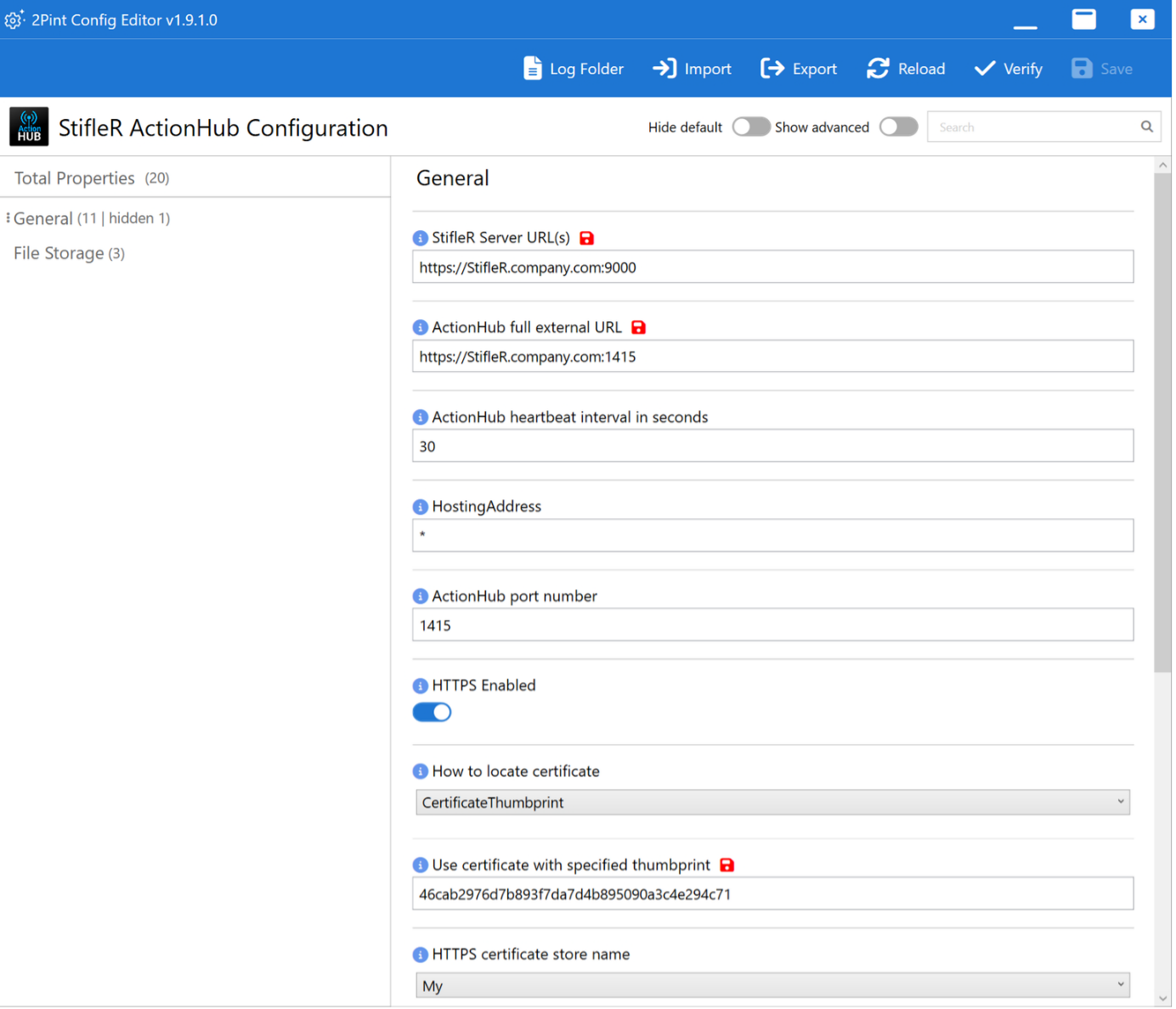
StifleR 3.0 Action Hub configuration
Tuning the motor
There are several technical improvements under the hood, such as improved data persistency. We’ve nearly tripled the different types of data stored, meaning we can provide better analytics and give you visibility into the flow of traffic, both in real time, and historically for comparative performance analysis. We’re introducing Online Services that improve the performance and stability of Network and Network Group geocoding services.
Drilling down to the source of problems
The user interface has been improved to provide deeper analytics across network usage, bandwidth history, and deployment trends, making it easier to spot issues, track usage, and plan rollouts. With StifleR 3.0 you have more filters and more ways to slice and dice the data to drill down from 10,000-feet overviews to inspect a specific location, network group, or subnet to see exactly who’s pulling what, how and why. The addition of location services with device geo-tracking assists teams on the ground to quickly locate, diagnose, and resolve issues.
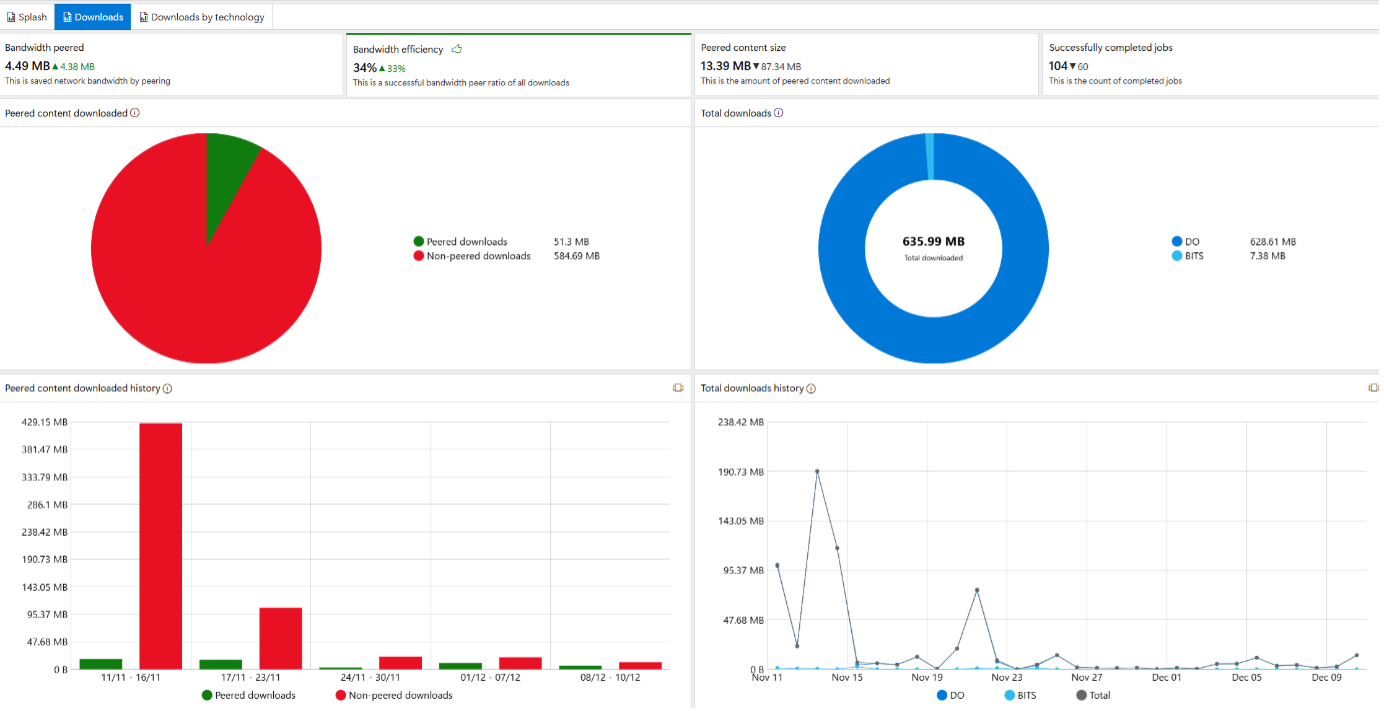
StifleR 3.0 dashboard: Download peering
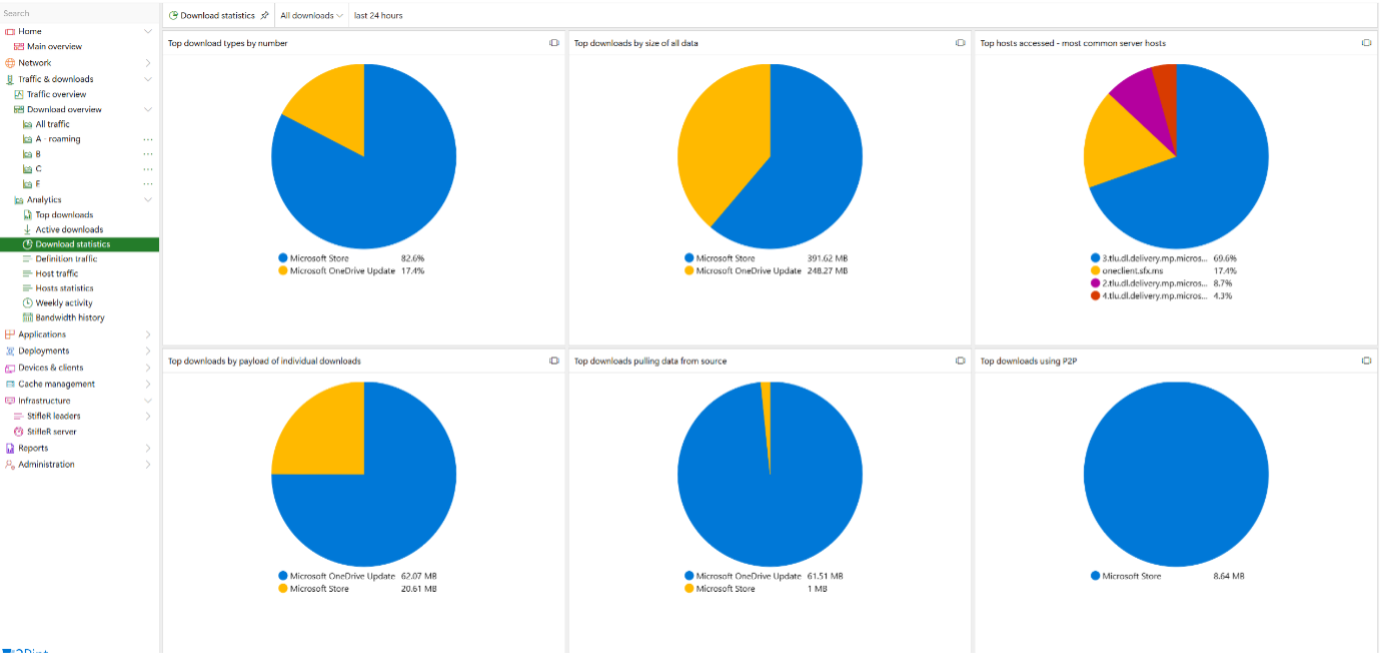
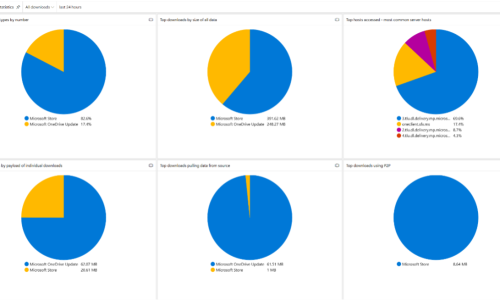
StifleR 3.0 dashboard: Download statistics by source and type
Authentication and access are not just pretty words
Security is always top of mind for customers, who need to limit roles to the intended permissions and no more. With the addition of modern authentication, StifleR 3.0 now supports single sign-on and federated identity when used with your enterprise identity infrastructure. We continue to build out role-based access control (RBAC) within StifleR, and in 3.0, remote admin tools are secured with RBAC. You decide who can use which tool, improving both compliance and control. This gives fine-grained control which provides a new way for IT teams to manage and support end users and efficiently manage and troubleshoot endpoints. The browser-based management and troubleshooting tools (RemoteR) include:
- File and event-based logging
- Explorer and registry access
- WMI, Performance Monitor, Resource Monitor, and Task Manager
And more...(a blog all on its own!).
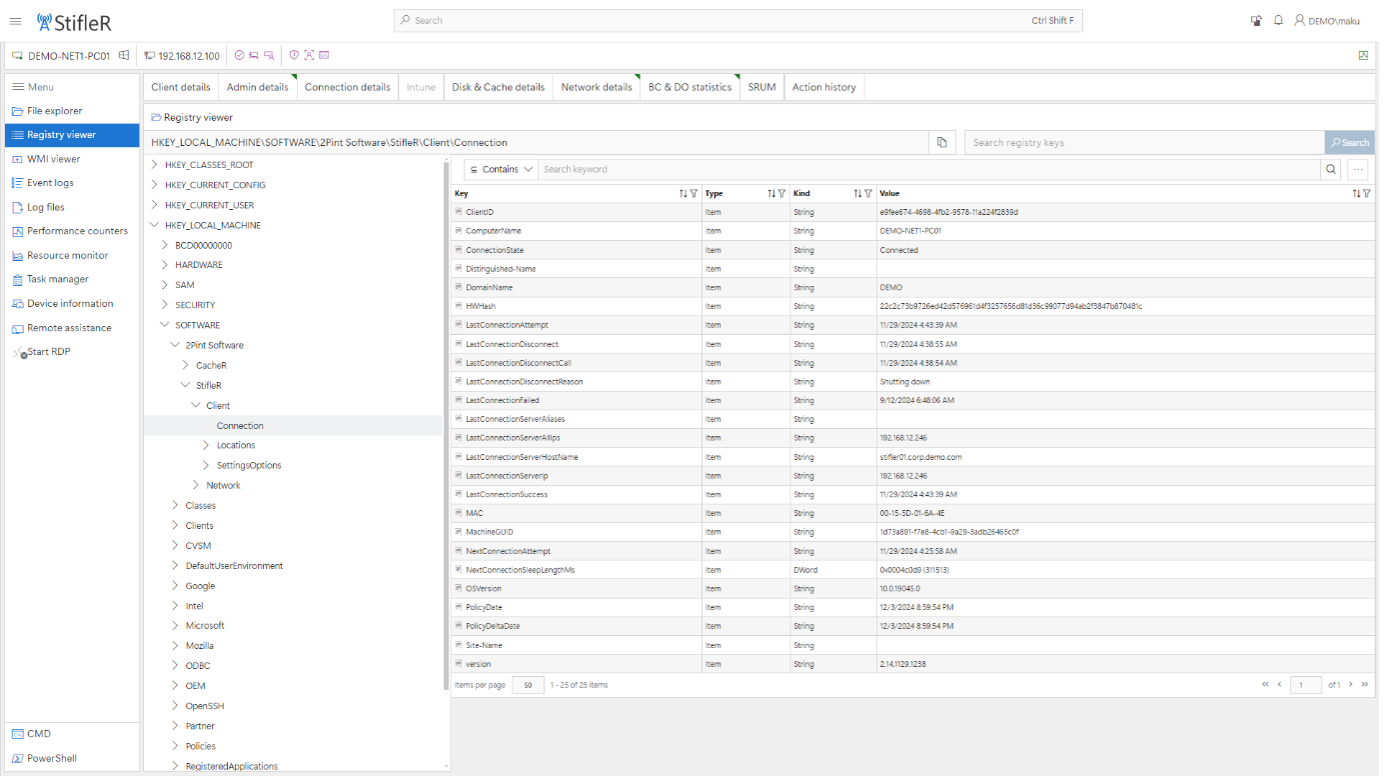
StifleR 3.0 Registry viewer
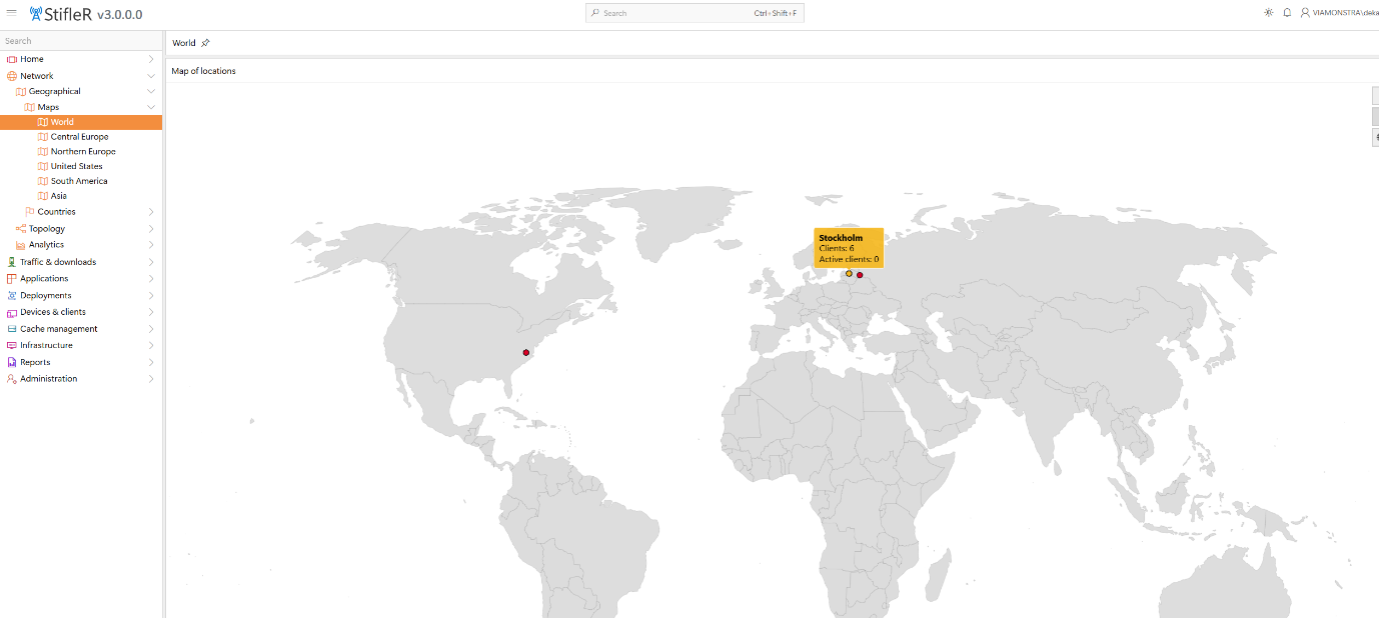
StifleR 3.0 dashboard: Network locations world map
Integrations strategy support – even if you are stuck on the bridge
How often have you needed to begin your deployments, go away and then come back to find they had failed, or you did not have real-time insight into the status. StifleR 3.0 is not only for network and bandwidth management – it’s also integral to analysis and visualization of OS deployment. It works alongside ConfigMgr, Autopilot, Intune, etc. to provide device provisioning and Intune deployment status directly in the dashboards. With StifleR 3.0 deep dive task sequence execution and the historical reporting, gaining visibility into device enrolments, application rollouts, and compliance – even during large-scale or remote deployments. Remove the challenging blind spots during deployments that are time-consuming issues and dive straight into real‑time insights with the OS analytics for full greater awareness, whether you are still on-prem, have a Cloud first journey, or as we see with many today, stuck on that bridge with no way to get off between both scenarios.
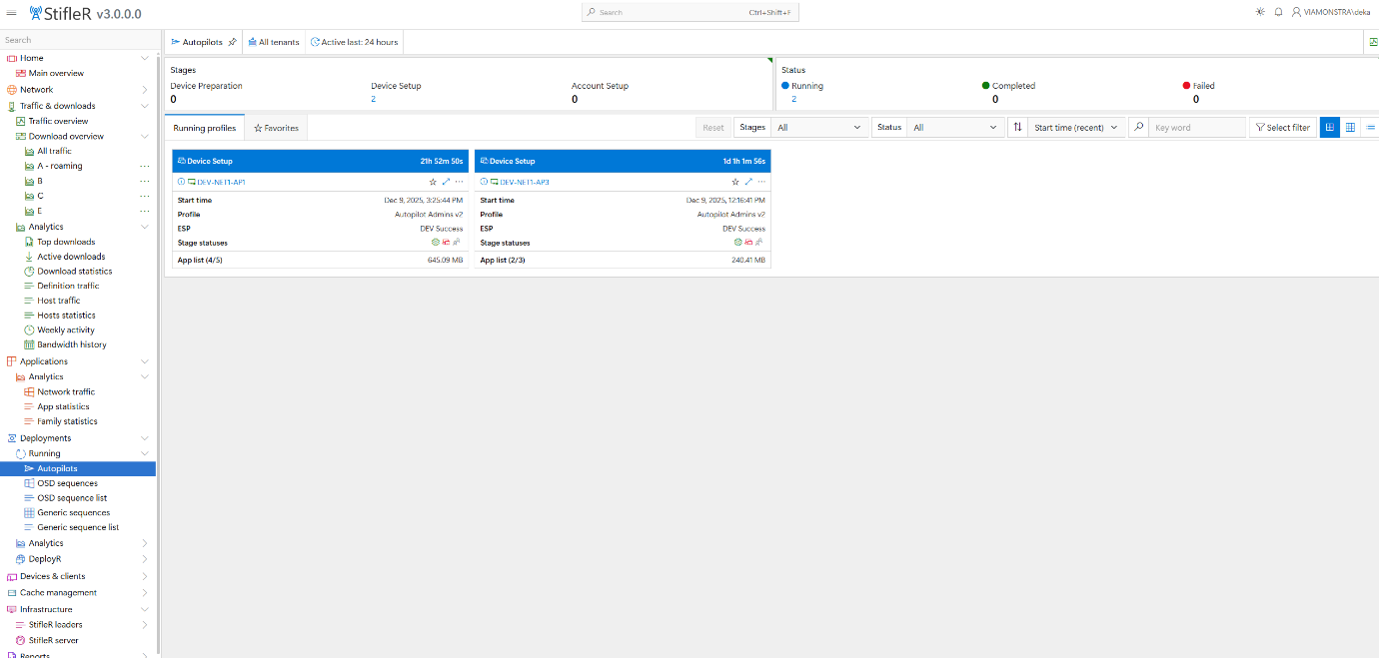
StifleR 3.0 dashboard: Autopilot deployments
StifleR 3.0, the wingman for DeployR
We can’t talk about OS deployment without mentioning DeployR. 2Pint Software’s DeployR has been the talk around town for some time now and in November the official general release was announced. StifleR 3.0 fully supports DeployR workflow integration. If you are rolling out the latest OS images, building devices at scale, recovering from major events, or building your latest fleet with DeployR, then StifleR 3.0 is the wingman – not only for the visualizations but to also ensure the content is peering and optimizing bandwidth to protect your organization. With StifleR 3.0 on hand, you don’t have to leave your console to do anything. Whether you deploy OS images via OSD, Autopilot, or DeployR — StifleR 3.0 supports the complete end-to-end workflow, with optimized content delivery, peering, and bandwidth management for efficient scale deployments.
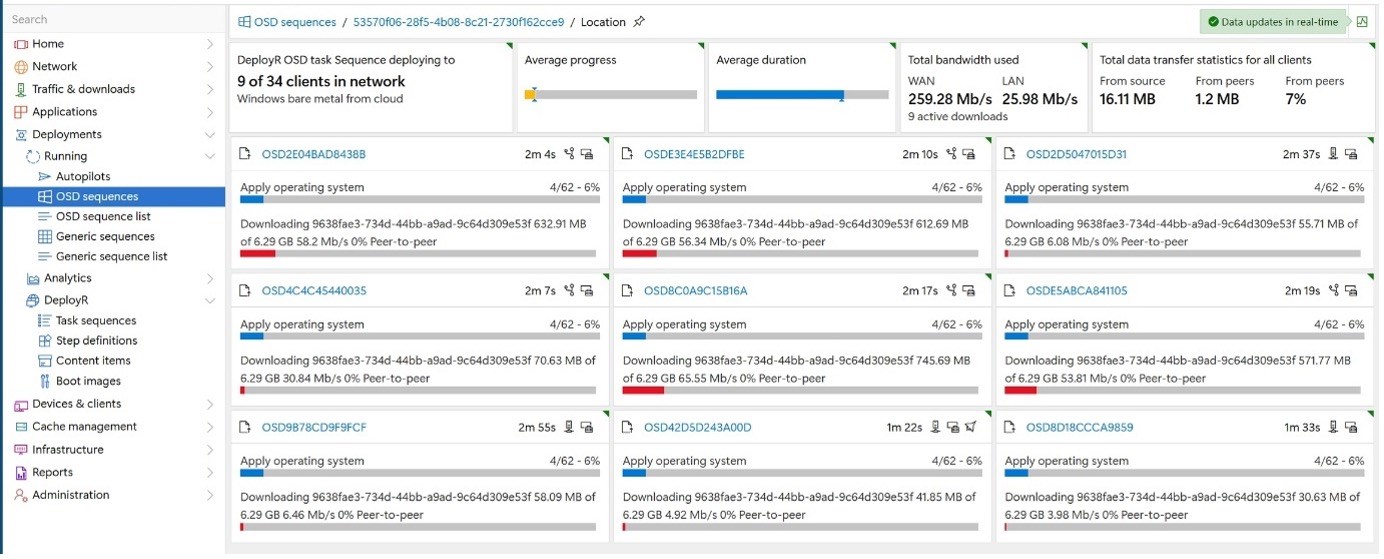
StifleR 3.0 dashboard: OSD sequences
Ready to see it?
If you’re curious about StifleR 3.0, want a tour, or need to understand the use cases more, then we would be delighted to hear from you. Reach out to the 2Pint Software team — we’d love to show you around and give you the tour!
Top Posts
2Pint Software and Omnissa partnership: Closing the gaps in OS deployment, bare-metal imaging, bandwidth optimization, and endpoint recovery
2Pint Software blog roundup - early summer 2026 edition
2Pint Software blog roundup - spring 2026 edition

By Ranjith Lewis

By David Meurer
By David Meurer

By Andreas Hammarskjöld